A Tavexio brand category is a discovery page, not the final proof of a product identity. It can narrow the catalogue to records grouped under a brand, but an adult reader should still open the individual product page and match the complete title, SKU, sale unit and canonical URL. Similar brand names, colour words or images do not make records interchangeable. This guide explains a repeatable category-to-record method without ranking products or inferring taste, effects, quality, origin, safety or suitability.
Know what the category has established
Opening a brand category establishes that Tavexio groups the displayed candidates under that category at the time checked. It does not establish that the candidates have the same variant, numeric wording, carton record or SKU. Start from the Tavexio catalogue hub, select a brand route, and treat the resulting page as a shortlist.
A category label is one field in a larger record. The individual page supplies the exact title and structured details. If an item appears in a surprising group, do not silently rewrite its name or assign new facts. Record the category and product page separately, then use the product page for the final identity match.
Worked example: moving from ESSE to SS-303
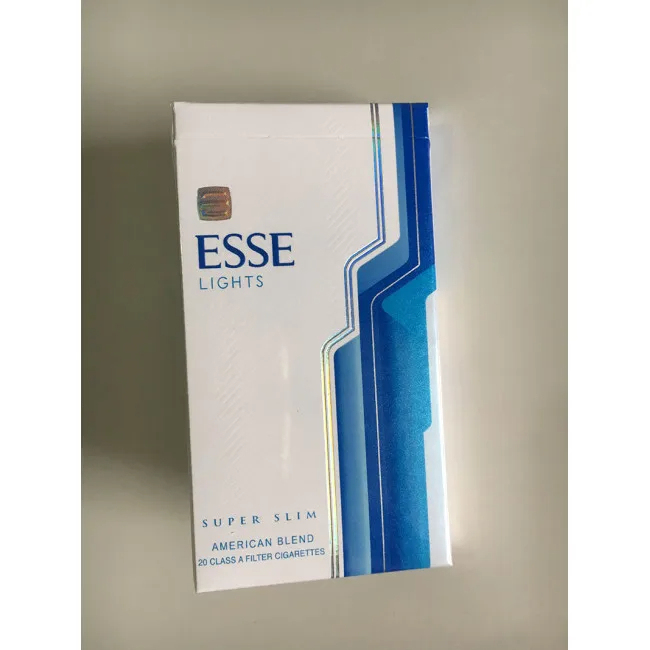
The ESSE category is a discovery route containing distinct ESSE records. One candidate is ESSE Lights Super Slim – 1 Carton (10 Packs), SKU SS-303. The attached image belongs to that live product record. To identify it accurately, retain “ESSE”, “Lights”, “Super Slim”, the one-carton unit and SS-303.
Searching only for “Super Slim” loses information. Other records can use overlapping format or colour words. Likewise, searching only for ESSE stops at the brand level. The exact product identity appears only when the complete title is joined to its SKU and URL.
A category-to-record worksheet
| Stage | Record | Question |
|---|---|---|
| Catalogue hub | Products page and observation date | Which brand route is relevant? |
| Brand category | Category name and URL | Which current candidates are shown? |
| Product page | Complete title and canonical URL | What exact entry is this? |
| Structured key | SKU | Does the code match the intended entry? |
| Sale unit | Carton and pack count | What quantity does this record describe? |
| Current conditions | Price, stock and date checked | What does the page display now? |
Keep the first five fields in an identity note. Keep price and stock in a separate current-conditions note. That boundary prevents a temporary amount from becoming part of the name and prevents an older availability state from being repeated as a current fact.
Do not infer meaning from category order
The first item displayed is not necessarily a recommendation, bestseller, safer option or better match. Category ordering can reflect site configuration and can change. This guide does not use position as evidence of popularity, value or quality. Compare the actual product records instead.
The same caution applies to category counts and adjacent images. An image can orient a reader, but it cannot supply a missing SKU or settle a title conflict. A nearby item does not lend its specifications to another record. When a field is absent or inconsistent, stop at the uncertainty.
Handle overlapping words neutrally
Brand catalogues often contain repeated colour, edition, number or range words. Treat each as text in an ordered title. Do not translate “lights”, “blue”, “red”, “menthol”, a geographic phrase or an “mg” number into a health conclusion. Do not use those words to claim authenticity, manufacturing origin, legal status, delivery eligibility or a predictable experience.
A reliable brand note can say that a word is present, absent or placed differently. It can map a full title to a SKU. It cannot create missing specifications. This documentary approach is especially important when two entries differ by only one or two words.
Finish the match on the current page
According to the Tavexio Terms and Conditions, the store information shown on the live item and cart pages governs at ordering time, while availability and other displayed details can change. Reopen the product page immediately before using the information. If a cart is involved, check that its line item preserves the intended title and quantity.
- Enter through the current catalogue or brand category.
- Open the individual candidate instead of relying on the category card.
- Copy the complete title in its displayed order.
- Match the SKU and the stated one-carton, 10-pack unit.
- Save the canonical Tavexio URL.
- Date price and stock observations separately.
- Stop and ask a focused question if the title, SKU, image or cart line conflicts.
What a support-ready brand reference looks like
A concise reference contains the full product title, SKU, product URL and the field needing clarification. It does not need a broad claim about the brand. If the question concerns a changing price or stock display, include the date observed. If it concerns an order, keep order details private and provide only the identifiers needed through the site’s contact route.
Adult and health notice: Tavexio is intended for adults aged 18 or older at eligible Australian delivery addresses. Tobacco contains nicotine, and smoking causes serious health risks. Brand categories and catalogue names do not indicate safety. This guide is neutral identification information, not health advice or a recommendation to smoke.